介绍
多态性是面向对象编程的又一个重要特征,它是指在父类中定义的属性和方法被子类继承之后,可以具有不同的数据类型或表现出不同的行为,这使得同一个属性或方法在父类及其各个子类中具有不同的含义。
对面向对象来说,多态分为编译时多态和运行时多态。其中编译时多态是静态的,主要是指方法的重载,它是根据参数列表的不同来区分不同的方法。通过编译之后会变成两个不同的方法,在运行时谈不上多态。
而运行时多态是动态的,它是通过动态绑定来实现的,也就是大家通常所说的多态性。
以下部分内容摘自这位博主,写的非常好,推荐
Java 实现多态有 3 个必要条件:继承、重写和向上转型。只有满足这 3 个条件,开发人员才能够在同一个继承结构中使用统一的逻辑实现代码处理不同的对象,从而执行不同的行为。
- 继承:在多态中必须存在有继承关系的子类和父类。
- 重写:子类对父类中某些方法进行重新定义,在调用这些方法时就会调用子类的方法。
- 向上转型:在多态中需要将子类的引用赋给父类对象,只有这样该引用才既能可以调用父类的方法,又能调用子类的方法
多态的格式:
父类类型 变量名 = new 子类类型();
变量名.方法名();
举例说明
当使用多态方式调用方法是,首先检查父类中是否有该方法,如果没有,则编译错误,如果有,执行的是子类重写后的方法。如果子类没有重写该方法,就会调用父类的该方法。总结:编译看左边,运行看右边
定义动物父类:
1
2
3
4
5
6
7
8
9
10
11
12
13
| package com.base.learn;
public class Animal {
public void eat() {
System.out.println("动物它们都会吃东西!!!");
}
}
|
定义猫咪子类:
1
2
3
4
5
6
7
8
9
10
11
12
| package com.base.learn;
public class Cat extends Animal {
public void eat() {
System.out.println("小猫咪都喜欢吃罐头!");
}
}
|
定义狗子类:
1
2
3
4
5
6
7
8
9
10
11
12
| package com.base.learn;
public class Dog extends Animal {
public void eat() {
System.out.println("小狗爱吃骨头!");
}
}
|
定义测试类,测试多态性:
1
2
3
4
5
6
7
8
9
10
11
12
13
14
15
16
17
| package com.base.learn;
public class Demo {
public static void main(String[] args) {
Animal animal = new Cat();
animal.eat();
Animal animal12 = new Dog();
animal12.eat();
}
}
|
可以看出我们可以使用多态性得到不同动物的一个吃的行为属性
多态的好处
提高了代码的拓展性,使用父类类型作为方法形参,传递子类对象给方法,进行方法的调用
1
2
3
4
5
6
7
8
9
10
11
12
13
14
15
| package com.base.learn;
public class Demo2 {
public static void main(String[] args) {
animalEat(new Cat());
animalEat(new Dog());
}
public static void animalEat(Animal animal) {
animal.eat();
}
}
|
可以看出由于多态性,我们的 animalEat 方法的形参是 Animal 类型参数,父类型接受子类对象,进而执行子类对象的方法。
多态的弊端
无法访问子类独有的功能
1
2
3
4
5
6
7
8
9
10
11
12
13
14
15
16
| package com.base.learn;
public class Cat extends Animal {
public void eat() {
System.out.println("小猫咪都喜欢吃罐头!");
}
public void playBall() {
System.out.println("小猫咪都喜欢小球!");
}
}
|
1
2
3
4
5
6
7
8
9
10
11
| package com.base.learn;
public class Demo3 {
public static void main(String[] args) {
Animal animal = new Cat();
animal.eat();
}
}
|
可以看到动物类和猫咪类有个共同的方法 eat,但是猫咪多了一个 playBall 方法。而对于动物对象来说,它本身动物类没有 playBall 方法,所以编译报错
引用类型转换:
引用类型转换
从上面的多态的弊端的案例中,我们可以看到,我们使用动物对象时无法直接访问到猫类中的玩球球方法,这也就是我们之前说的编译看左边,运行看右边。
而在我们使用多态方式调用方法时,首先检查会左边的父类中是否有该方法,如果没有,则编译错误。也就代表着,父类无法调用子类独有的方法。
所以说,如果编译都错误,更别说运行了。这也是多态给我们带来的一点小困扰,而我们如果想要调用子类特有的方法,必须做向下转型。
向上转型(自动转换)
对于向下转型,我们先来讲解下向上转型的概念吧。
向上转型:
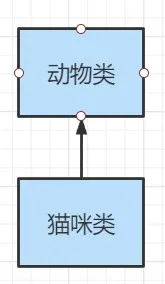
多态本身是子类向父类向上转换(自动转换)的过程,这个过程是默认的。当父类引用指向一个子类对象时,便是向上转型。
对于父类和子类的关系来说,具体来看图说话:
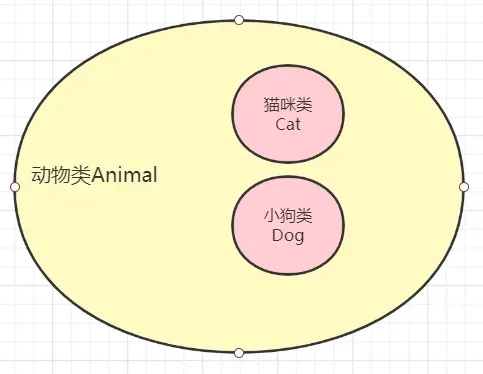
父类相对与子类来说是大范围的类型,Animal 是动物类,是父类。而 Cat 是猫咪类,是子类。
所以对于父类 Animal 来说,它的范围是比较大的,它包含一切动物,包括猫咪类和小狗类。
所以对于子类类型这种范围小的,我们可以直接自动转型给父类类型的变量。
使用格式:
1
2
3
4
5
6
| 父类类型 变量名 = new 子类类型();
如:Animal animal = new Cat();
相当于有:
Animal animal = (Animal) new Cat();
|
相当于自动帮我们了一个隐形的转换为动物类的一个过程,因为动物本身就包含了猫咪。
向下转型(强制转换)
向上转型可以知道它是子类自动转换为父类的一个过程,所以我们现在再来看看向下转型的定义:
向下转型:
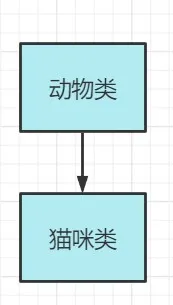
向下转型就是由父类向子类向下转换的过程,这个过程是强制的。一个需要将父类对象转为子类对象,可以使用强制类型转换的格式,这便是向下转型。
为什么这种就必须自己强制加上一个类型转换过程呢?
对于父类和子类的关系来说,我们接着看图说话:
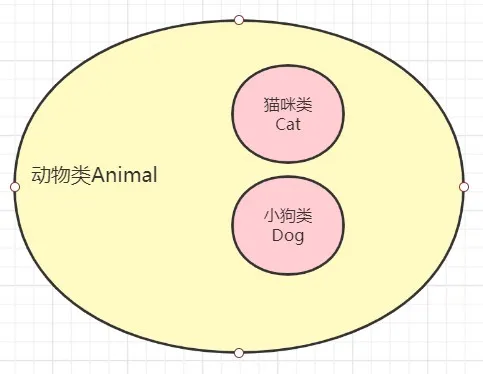
对于猫咪类的话,它在动物类中只是其中的一部分吧,而对于动物类来说,它有许多其他子类动物如狗,牛,猪等等。
所以对于动物父类想要向下转型的时候, 它此时不知道指向那个子类,因为不确定呀,所以就必须自己加上强制的类型转换的一个过程。
使用格式:
1
2
3
4
5
| 子类类型 变量名 = (子类类型) 父类变量名;
如:
Animal animal = new Cat();
Cat cat = (Cat) animal;
cat.playBall();
|
所以对于多态的弊端,无法使用子类特有的参数,我们也解决啦,可以通过向下转型的方法,从而将类型强制转换为某个子类对象后,再去调用子类的特有方法!
转型的异常
虽然我们可以使用向下转型使得我们可以使用子类的独有方法,但是转型的过程中,一不小心就会遇到这样的问题了,来,我们来看看下面的代码:
定义狗类中额外的独有遛狗方法
1
2
3
4
5
6
7
8
9
10
11
12
13
14
15
16
| package com.base.learn;
public class Dog extends Animal {
public void eat() {
System.out.println("小狗爱吃骨头!");
}
public void walk() {
System.out.println("遛狗!");
}
}
|
1
2
3
4
5
6
7
8
9
10
11
12
13
14
15
16
| package com.base.learn;
public class Demo4 {
public static void main(String[] args) {
Animal a = new Cat();
a.eat();
Dog d = (Dog) a;
d.walk();
}
}
|
我们可以看到,虽然我们的代码通过编译,但是终究在运行时,还是出错了,抛出了 ClassCastException 类型转换的异常。
其实我们可以知道,我们在上面的时候,创建了 Cat 类型对象,而在向下转型时,将其强行转换为了 Dog 类型,所以程序在运行时,就会抛出类型转换的异常!
instanceof 关键字
- Java为我们提供一个关键字
instanceof ,它可以帮助我们避免了 ClassCastException 类型转换异常的发生。 instanceof 是 Java 中的一个关键字,用来测试一个对象是否是某个类的实例,或者是该类的子类的实例。
其语法如下:
object instanceof ClassName
object 是需要进行类型检查的对象。ClassName 是要进行比较的类或接口。
如果 object 是 ClassName 类或其子类的实例,instanceof 返回 true,否则返回 false。
代码实现:
1
2
3
4
5
6
7
8
9
10
11
12
13
14
15
16
17
18
19
20
| package com.base.learn;
public class Demo5 {
public static void main(String[] args) {
Animal animal = new Cat();
animal.eat();
if (animal instanceof Cat) {
Cat cat = (Cat) animal;
cat.playBall();
}else if (animal instanceof Dog) {
Dog dog = (Dog) animal;
dog.walk();
}
}
}
|
可以发现,它可以帮助我们在做类型转换前,判断该类型是否属于该类型或者子类类型,如果是,我们就可以强转啦!
视频教程总结
1.理解多态性:可以理解为一个事物的多种态性
2.何为多态性:
- 对象的多态性:父类的引用指向子类的对象(或子类的对象赋值给父类的引用)
3.多态的使用:虚拟方法调用
- 有了对象多态性以后,我们在编译期,只能调用父类声明的方法,但在执行期实际执行的是子类重写父类的方法
- 简称:编译时,看左边;运行时,看右边。
- 若编译时类型和运行时类型不一致,就出现了对象的多态性(Polymorphism)
- 多态情况下:
- “看左边”:看的是父类的引用(父类中不具备子类特有的方法)
- “看右边”:看的是子类的对象(实际运行的是子类重写父类的方法)
4.多态性的使用前提:
5.对象的多态性:只适用于方法,不适用于属性(编译和运行都看左边)
练习1
1
2
3
4
5
6
7
8
9
10
11
12
13
14
15
16
17
18
19
20
21
22
23
24
25
26
27
28
29
30
31
32
33
34
| package com.base.learn;
public class Demo6 {
public static void main(String[] args) {
Sub s= new Sub();
System.out.println(s.count);
s.display();
Base b = s;
System.out.println(b == s);
System.out.println(b.count);
b.display();
}
}
class Base {
int count= 10;
public void display() {
System.out.println(this.count);
}
}
class Sub extends Base {
int count= 20;
public void display() {
System.out.println(this.count);
}
}
|
练习2
1
2
3
4
5
6
7
8
9
10
11
12
13
14
15
16
17
18
19
20
21
22
23
24
25
26
27
28
29
30
31
| package com.base.learn;
public class Demo7 {
public static void main(String[] args) {
Base1 base = new Sub1();
base.add(1, 2, 3);
Sub1 s = (Sub1) base;
s.add(1, 2, 3);
}
}
class Base1 {
public void add(int a, int... arr) {
System.out.println("base");
}
}
class Sub1 extends Base1 {
public void add(int a, int[] arr) {
System.out.println("sub_1");
}
public void add(int a, int b, int c) {
System.out.println("sub_2");
}
}
|
练习题
1
2
3
4
5
6
7
8
9
10
11
12
13
14
15
16
17
18
19
20
21
22
23
24
25
26
27
28
29
30
31
32
33
34
35
36
| package com.base.learn;
public class GeometricObject {
protected String color;
protected double weight;
public GeometricObject(String color, double weight) {
this.color = color;
this.weight = weight;
}
public String getColor() {
return color;
}
public void setColor(String color) {
this.color = color;
}
public double getWeight() {
return weight;
}
public void setWeight(double weight) {
this.weight = weight;
}
public double findArea() {
return 0.0;
}
}
|
1
2
3
4
5
6
7
8
9
10
11
12
13
14
15
16
17
18
19
20
21
22
23
24
| package com.base.learn;
public class Circle extends GeometricObject{
private double radius;
public Circle(String color, double weight, double radius) {
super(color, weight);
this.radius = radius;
}
public double getRadius() {
return radius;
}
public void setRadius(double radius) {
this.radius = radius;
}
@Override
public double findArea(){
return 3.14 * radius * radius;
}
}
|
1
2
3
4
5
6
7
8
9
10
11
12
13
14
15
16
17
18
19
20
21
22
23
24
25
26
27
28
29
30
31
32
33
34
| package com.base.learn;
public class MyRectangle extends GeometricObject {
private double width;
private double height;
public MyRectangle(String color, double weight, double width, double height) {
super(color, weight);
this.width = width;
this.height = height;
}
public double getWidth() {
return width;
}
public void setWidth(double width) {
this.width = width;
}
public double getHeight() {
return height;
}
public void setHeight(double height) {
this.height = height;
}
@Override
public double findArea() {
return width * height;
}
}
|
1
2
3
4
5
6
7
8
9
10
11
12
13
14
15
16
17
18
19
20
21
22
23
24
25
26
27
28
29
30
31
32
33
34
35
36
37
| package com.base.learn;
public class GeometricTest {
public static void main(String[] args) {
GeometricTest test = new GeometricTest();
Circle c1 = new Circle("white", 1.0, 2.3);
test.displayGeometricObject(c1);
Circle c2 = new Circle("white", 1.0, 3.3);
test.displayGeometricObject(c2);
boolean isEqual = test.equalsAres(c1, c2);
System.out.println(isEqual);
MyRectangle rect = new MyRectangle("red", 1.0, 2.1, 3.4);
test.displayGeometricObject(rect);
}
public void displayGeometricObject(GeometricObject o) {
System.out.println("面积为:" + o.findArea());
}
public boolean equalsAres(GeometricObject o1, GeometricObject o2) {
return o1.findArea() == o2.findArea();
}
}
|