Object 类

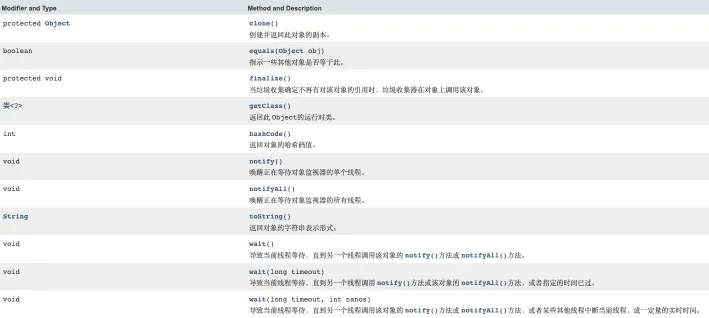
  • java.lang.Object 类是所 Java 类的根父类
  • 如果在类的声明中未使用 extends 关键字指明父类,则默认父类是 Object 类。Object 类中的功能(属性、方法)就具有通用性属性
  • equals()/toString()/getClass()/hashCode()/clone()/finalize()/wait()/notify()/notifyAll()
  • Object 类只声明了一个空参的构造器 地址

== 和 equals 的区别

回顾 == 的使用

  • == 是运算符
  • 可以使用在基本数据类型变量和引用数据类型变量中
    • 如果比较的是基本数据类型变量:比较两个变量保存的数据是否相等(涉及自动类型提升)
    • 如果比较的是引用数据类型变量:比较两个对象的地址值是否相同(即两个引用是否指向同一个对象实体)
  • 补充:使用时,必须保证符号左右两边的变量类型一致

equals() 方法的使用

  • 一个方法,不是运算符,只能适用于引用数据类型
  • Object 类中定义的 equals() 的方法:作用和 == 相同,比较两个对象的地址值是否相同
  • DateStringFile 包装类等都对 equals 方法进行了重写,重写之后比较的不再是引用的地址,而是比较两个对象的实体内容是否相同
  • 通常情况下,自定义的类如果使用 equals 方法的话,通常是比较两个对象的实体内容是否相同。就需要对 equals 方法进行重写

重写 equals() 方法的原则

  • 对称性:如果x.equals(y)返回是“true”,那么y.equals(x)也应该返回是“true”
  • 自反性:x.equals(x)必须返回是“true”
  • 传递性:如果x.equals(y)返回是“true”,而且y.equals(z)返回是“true”,那么z.equals(x)也应该返回是“true”
  • 一致性:如果x.equals(y)返回是“true”,只要x和y内容一直不变,不管你重复x.equals(y)多少次,返回都是“true”
  • 任何情况下,x.equals(null),永远返回是“false”;x.equals(和x不同类型的对象)永远返回是“false”
1
2
3
4
5
6
7
8
9
10
11
12
13
14
15
16
17
18
19
20
21
22
23
24
25
26
27
28
29
30
31
32
33
34
35
36
37
38
39
40
41
42
43
package com.base.learn;

/**
* Customer 类未重写 equals 方法
*
*/
public class Customer {
private String name;
private int age;

public Customer() {

}
public Customer(String name, int age) {
this.name = name;
this.age = age;
}

public String getName() {
return name;
}

public void setName(String name) {
this.name = name;
}

public int getAge() {
return age;
}

public void setAge(int age) {
this.age = age;
}

@Override
public boolean equals(Object o) {
if (this == o) return true;
if (o == null || getClass() != o.getClass()) return false;
Customer customer = (Customer) o;
return age == customer.age && name.equals(customer.name);
}
}

1
2
3
4
5
6
7
8
9
10
11
12
13
14
15
16
17
18
19
20
21
22
23
24
25
26
27
28
29
30
31
32
33
34
35
36
37
38
39
40
package com.base.learn;
import java.util.Date;

/**
* ==、equals 的使用,未重写 Customer 类 equals
*/
public class Demo {
public static void main(String[] args) {
// 基本数据类型
int a = 10;
int b = 10;
double c = 10.0;
System.out.println(a == b); // true
System.out.println(a == c); // true

// boolean d = true;
// System.out.println(a == d);

char c1 = 'A';
char c2 = 65;
System.out.println(c1 == c2); // true

// 引用数据类型
Customer cust1 = new Customer("Tom", 21);
Customer cust2 = new Customer("Tom", 21);
System.out.println(cust1 == cust2); // false

String str1 = new String("BAT");
String str2 = new String("BAT");
System.out.println(str1 == str2); // false
System.out.println("------------");
System.out.println( ); // 重写了 equals() 方法,返回 true
System.out.println(str1.equals(str2)); // true

Date date1 = new Date(223232323232L);
Date date2 = new Date(223232323232L);
System.out.println(date1.equals(date2)); // true
}
}

toString

  • 当我们输出一个引用对象时,实际上就是调用当前对象的 toString()
1
2
3
4
5
6
7
public void println(Object x) {
String s = String.valueOf(x);
synchronized (this) {
print(s);
newLine();
}
}
1
2
3
public static String valueOf(Object obj) {
return (obj == null) ? "null" : obj.toString();
}
  • Object 类中 toString 的定义方法
1
2
3
public String toString() {
return getClass().getName() + "@" + Integer.toHexString(hashCode());
}
  • 像 String、Date、File、包装类等都重写了 Object 类中的 toString() 方法。使得在调用 toString() 时,返回”实体内容”信息
  • 自定义类如果重写toString()方法,当调用此方法时,返回对象的”实体内容”

下面是一个简单的例子:

1
2
3
4
5
6
7
8
9
10
11
12
13
14
15
16
17
18
19
20
21
22
23
24
25
26
27
28
29
30
31
32
33
34
35
36
package com.base.learn;

public class Customer {
private String name;
private int age;

public Customer(String name, int age) {
this.name = name;
this.age = age;
}

public String getName() {
return name;
}

public void setName(String name) {
this.name = name;
}

public int getAge() {
return age;
}

public void setAge(int age) {
this.age = age;
}

@Override
public String toString() {
return "Customer{" +
"name='" + name + '\'' +
", age=" + age +
'}';
}
}

1
2
3
4
5
6
7
8
9
10
11
12
13
14
15
16
17
package com.base.learn;

import java.util.Date;

public class ToStringTest {
public static void main(String[] args) {
Customer cust1 = new Customer("Tom", 21);
System.out.println(cust1); // 未重写 toString 返回:com.base.learn.Customer@29453f44
System.out.println(cust1); // 重写后 toString 返回:Customer{name='Tom', age=21}

String str = new String("AA");
System.out.println(str); // AA

Date date = new Date(45362348664663L);
System.out.println(date); // Wed Jun 24 12:24:24 CST 3407
}
}

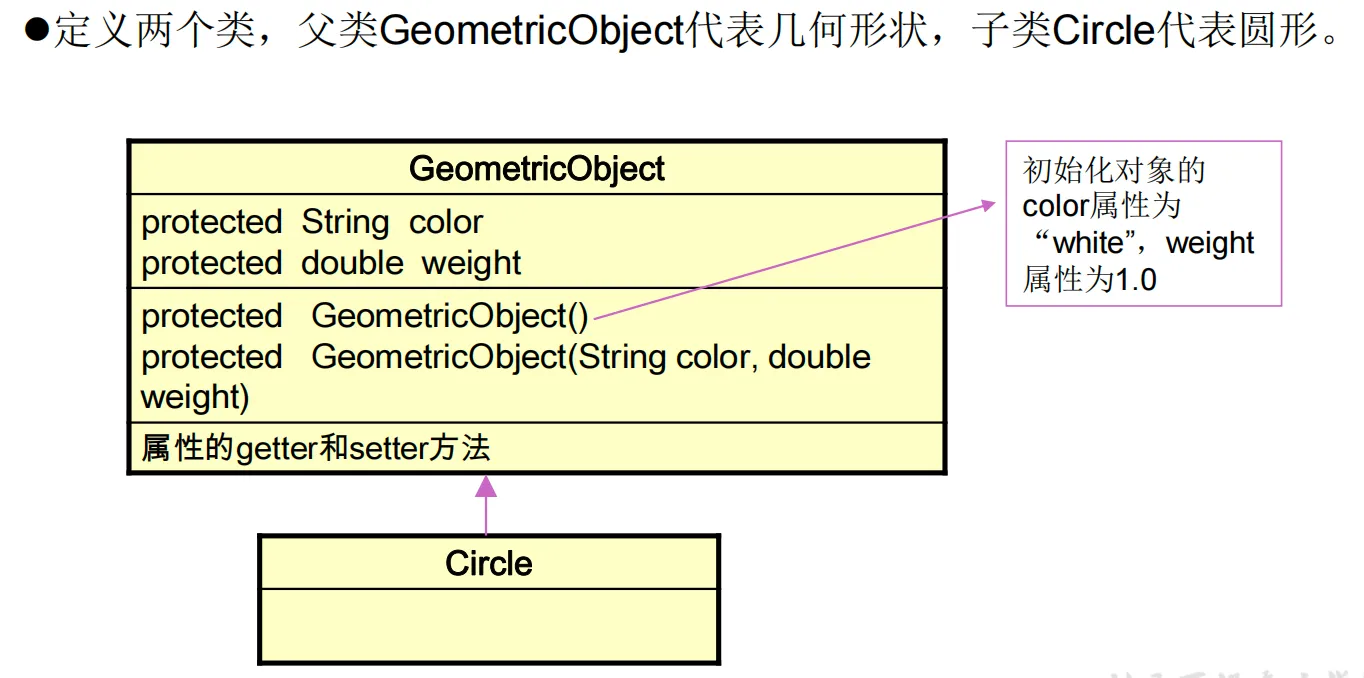
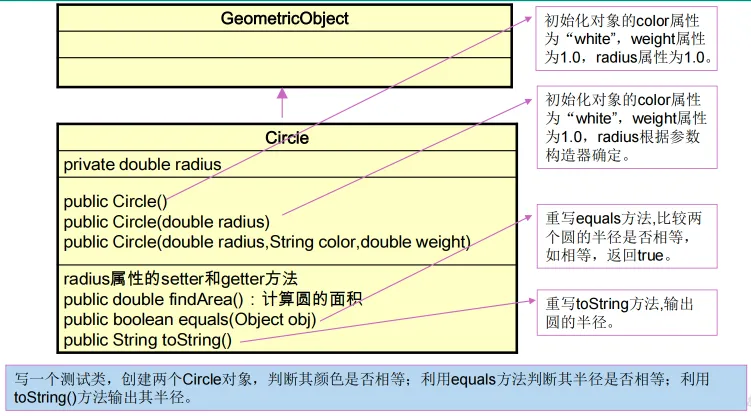
练习题目

1
2
3
4
5
6
7
8
9
10
11
12
13
14
15
16
17
18
19
20
21
22
23
24
25
26
27
28
29
30
31
32
33
package com.base.learn2;

public class GeometricObject {
protected String color;
protected double weight;

public GeometricObject() {
this.color = "white";
this.weight = 1.0;
}

public GeometricObject(String color, double weight) {
this.color = color;
this.weight = weight;
}

public String getColor() {
return color;
}

public void setColor(String color) {
this.color = color;
}

public double getWeight() {
return weight;
}

public void setWeight(double weight) {
this.weight = weight;
}
}

1
2
3
4
5
6
7
8
9
10
11
12
13
14
15
16
17
18
19
20
21
22
23
24
25
26
27
28
29
30
31
32
33
34
35
36
37
38
39
40
41
42
43
44
45
46
package com.base.learn2;

public class Circle extends GeometricObject{
private double radius;

public Circle() {
}

public Circle(double radius) {
this.radius = radius;
}

public Circle(String color, double weight, double radius) {
super(color, weight);
this.radius = radius;
}

public double getRadius() {
return radius;
}

public void setRadius(double radius) {
this.radius = radius;
}

// 计算圆的面积
public double findArea() {
return Math.PI * radius * radius;
}

@Override
public boolean equals(Object o) {
if (this == o) return true;
if (o == null || getClass() != o.getClass()) return false;
Circle circle = (Circle) o;
return Double.compare(circle.radius, radius) == 0;
}

@Override
public String toString() {
return "Circle{" +
"radius=" + radius +
'}';
}
}

1
2
3
4
5
6
7
8
9
10
11
12
13
14
15
16
17
18
package com.base.learn2;

public class Test {
public static void main(String[] args) {
Circle c1 = new Circle(2.3);
Circle c2 = new Circle("yellow",2.0,2.5);

// String 类重新了 equals() 方法,对比的是字符串是否相同
System.out.println("颜色是否一样:" + c1.getColor().equals(c2.getColor())); // false

// Circle 类重写了 equals() 方法,对比的是半径大小
System.out.println("半径是否相等:"+ c1.equals(c2)); // false

System.out.println(c1); // Circle{radius=2.3}
System.out.println(c2); // Circle{radius=2.5}

}
}